
Do you find yourself having to wade through estimates that are starting to get old and are now just clogging up the view your Manager SE Work-In-Progress (WIP) screen? You do NOT want to stop and open each one on the Order screen, then go to the Edit menu and select Remove Order one at a time for every one of these. That could take a long time — time that you could spend on more important tasks.
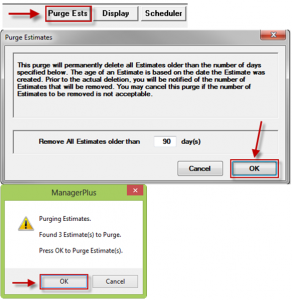
Instead, consider using the handy Purge Estimate feature to clear multiple aging estimates as once. It’s simply a matter of clicking the Purge Estimate button on the bottom of your WIP screen and then setting the ‘# of days’ threshold to set the range of records to remove. You may enter 90 days or any value that suits your purposes. Click OK to run it and then OK to the ‘confirm’ prompt and that cleanup job is done!
*Courtesy of Mitchell 1